
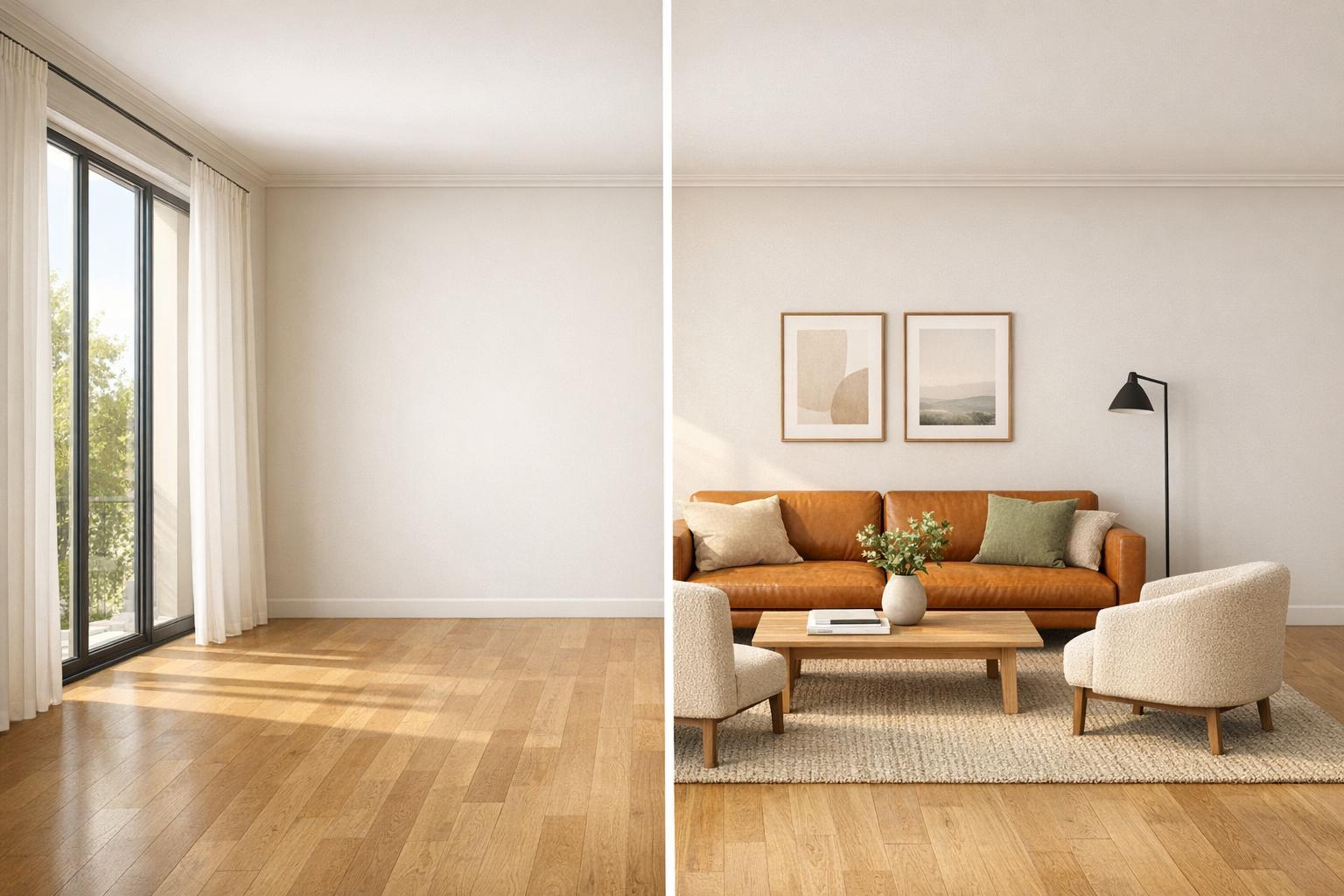
Virtual staging has become a game-changer in 2026, helping realtors create stunning online property listings quickly and affordably. With over 90% of buyers starting their search online and 80% struggling to visualize empty spaces, virtual staging solves these challenges by transforming empty rooms into appealing, furnished spaces (see these virtual staging before and after examples). AI-powered tools now offer photorealistic results in seconds, cutting costs dramatically compared to physical staging. Here’s a quick look at three top tools:
- InstantInterior AI: Affordable plans starting at $13.50/month for 100 renders, with results in 1–2 minutes, and features like furniture removal and wall painting.
- VirtualStagePro: Renders in under 2 minutes at $3.99 per image.
- StagingVision AI: Budget-friendly at $16/month for 6 images, combining AI and manual editing for polished results.
Quick Comparison:
| Tool | Pricing | Photorealism | Speed | Realtor Features |
|---|---|---|---|---|
| InstantInterior AI | $13.50/month (100 renders) | High | 1–2 minutes | Furniture removal, wall painting, MLS-ready images |
| VirtualStagePro | $3.99 per image | High | Under 2 minutes | Structural Awareness Engine, clutter removal |
| StagingVision AI | $16/month (6 images) | High (AI + manual) | 24–48 hours | Layout suggestions, AI + manual editing |
Virtual staging tools save time, reduce costs, and help properties sell faster. Choose the one that fits your needs, whether it’s speed, affordability, or design flexibility.

Virtual Staging Tools Comparison: Pricing, Speed, and Features for Realtors 2026
9 Affordable Virtual Staging Software Options For Real Estate
sbb-itb-4214aae
1. InstantInterior AI
InstantInterior AI is designed to transform interior photos into professionally staged spaces using AI trained in interior design. It captures room geometry, lighting, and architectural details to create realistic and visually appealing results.
Pricing
InstantInterior AI offers flexible pricing to cater to a variety of needs. The Hobby Plan costs $13.50 per month (billed annually) and provides 1,200 credits, which equates to around 100 renders per month - ideal for smaller agencies. For those needing more, the Premium Plan at $28.50 per month includes 7,200 credits (600 renders per month). Larger teams can opt for the Business Plan at $49.50 per month, which delivers 24,000 credits (2,000 renders per month). Each plan comes with a commercial license, allowing users to include the rendered images in MLS listings and marketing materials. Depending on the plan, the cost per render ranges from about $0.02 to $0.14.
Photorealism
The platform excels at creating photorealistic staging, ensuring shadows, lighting, and furniture placement align with the room's geometry. The AI automatically identifies the type of room and selects appropriate furnishings - for instance, a bedroom is staged with a bed and nightstands, not a dining table. While the renders don’t replicate architectural blueprints, they effectively capture buyers’ attention with visually engaging designs. This quality is paired with a fast turnaround time, making it a practical tool for realtors.
Speed
The process is impressively quick. After uploading a photo and choosing a design style, users receive fully staged images in just 1–2 minutes. This allows realtors to photograph a property in the morning and have ready-to-use images for MLS listings by the afternoon.
Realtor-Specific Features
InstantInterior AI includes several tools tailored for realtors. The "Empty the Room" feature digitally removes existing furniture or clutter, showcasing the space's potential. The "Paint Walls" tool refreshes outdated interiors without any manual effort. The platform also offers a variety of design styles - such as Modern, Scandinavian, Mid-Century Modern, Rustic, Bohemian, Industrial, and Coastal - ensuring agents can appeal to a wide range of buyer tastes.
For those on paid plans, additional perks include unbranded, ultra-high-resolution images perfect for MLS and social media. Users can also refine designs with text prompts or reference images if the initial render doesn’t meet expectations. These features integrate seamlessly into MLS and marketing workflows, making property presentations more polished and versatile.
2. VirtualStagePro
VirtualStagePro uses its proprietary Structural Awareness Engine to create a detailed digital wireframe of any room. This technology identifies key architectural elements like windows, doors, and ceiling heights, ensuring furniture placement feels natural and unobstructed. It also evaluates the room's lighting - whether it's natural sunlight or artificial fixtures - and applies realistic shadows and reflections through advanced ray-tracing. By combining architectural precision with lighting analysis, VirtualStagePro produces property images that meet the high standards of today’s digital marketplace.
Pricing
VirtualStagePro operates on a per-image pricing modal - at $3.99 per image at the time of writing this post.
Photorealism
VirtualStagePro boasts a photorealism score of 9.5 out of 10, delivering images that are almost indistinguishable from real photography. With access to a library of 50,000 hyper-realistic assets and design insights drawn from millions of successful real estate listings, it optimizes furniture layouts and enhances spatial perception to attract buyers effectively.
Speed
Speed is another standout feature. VirtualStagePro completes renders in under 2 minutes. Its batch processing capability allows entire properties to be staged at once, rather than room by room. For the best results, photographs should be taken from chest height (around 5 ft) using a 16–24mm wide-angle lens - avoiding extreme fisheye lenses, which can distort the AI's interpretation. These simple guidelines ensure seamless integration with the platform’s rapid processing capabilities.
Realtor-Specific Features
VirtualStagePro is packed with tools tailored for realtors. The Magic Eraser uses cutting-edge inpainting technology to remove clutter and reconstruct the underlying details, making it ideal for marketing occupied or distressed properties. Its Style Transfer and smart masking features simplify virtual renovations, enabling changes to wall colors or flooring without compromising the room’s structural details. According to the National Association of Realtors, 82% of buyers' agents say staging helps buyers visualize a property as their future home.
Next, let’s look at how StagingVision AI takes virtual staging to the next level.
3. StagingVision AI
StagingVision AI combines cutting-edge technology with expert editing to deliver virtual staging that stands out. By leveraging advanced 3D modeling, it places furniture with precision, while a team of skilled editors ensures every image is polished and ready to impress potential buyers.
Pricing
StagingVision AI offers a budget-friendly option for realtors, starting at $16 per month for 6 images (just $2.67 per image). This makes it a practical choice for those staging properties on a smaller scale or testing virtual staging without committing to larger plans.
Photorealism
This platform excels in blending AI-powered 3D modeling with skilled manual editing. The result? Furniture placement that feels natural, with lighting, shadows, and textures that look authentic. For the best results, high-quality, well-lit photos are recommended.
Realtor-Specific Features
StagingVision AI uses algorithms trained on millions of property listings to suggest layouts that enhance a room’s flow and functionality. This data-driven approach helps realtors showcase spaces in ways that appeal to buyers, making rooms feel more open and inviting. By combining AI precision with human touch, the platform delivers staging that is both visually appealing and effective at capturing attention.
Pros and Cons
Here’s a breakdown of the standout features and trade-offs of each tool based on our analysis.
Each platform brings its own advantages and challenges to the table. InstantInterior AI is a strong contender with its Hobby plan priced at $13.50/month for 100 renders. It offers commercial licensing and ultra-high-resolution images, making it ideal for marketing purposes. The ability to edit designs using style, inspiration, or text prompts adds a layer of flexibility that’s perfect for busy realtors who need quick adjustments.
VirtualStagePro sets itself apart with its proprietary Structural Awareness Engine. This feature creates a wireframe of the room’s architecture before placing furniture, significantly reducing common AI errors like floating objects or blocked doorways. With a photorealism score of 9.5/10, it delivers top-tier visuals, though its pricing details remain unclear.
StagingVision AI appeals to budget-conscious agents with its $16/month plan for 6 images, translating to about $2.67 per image. By combining AI-driven 3D modeling with manual editing, it produces polished results. However, this hybrid approach may take longer compared to fully AI-powered solutions.
"Staging companies are the first real estate segment entirely replaced by AI. The economics make it impossible to justify $3,000/month when $5 does the same job for online photos".
When it comes to speed, pure AI solutions can generate renders in seconds to under two minutes. On the other hand, hybrid approaches, like those used by StagingVision AI, may take 24–48 hours. For realtors working under tight deadlines, this difference in turnaround time could be a deciding factor. Below is a quick comparison of the tools to help clarify their strengths and limitations.
| Tool | Pricing | Photorealism | Speed | Realtor-Specific Features |
|---|---|---|---|---|
| InstantInterior AI | $13.50/month (100 renders) | High (ultra-high resolution) | Seconds | Commercial license, style/text editing, wall painting, room emptying |
| VirtualStagePro | $3.99 per image | High | Under 2 minutes | Structural Awareness Engine to minimize furniture placement errors |
| StagingVision AI | $16/month (6 images) | High (AI + manual) | Variable (hybrid) | Affordable option for smaller staging projects |
Choosing the right tool can make a significant difference by shortening the time a property spends on the market and generating stronger offers.
Conclusion
Selecting the best virtual staging tool depends on factors like how many listings you manage, the price range of the properties, and how much control you want over the design process. InstantInterior AI strikes a balance between affordability, speed, and commercial licensing, making it a flexible option for a variety of property types.
This tool is designed to meet the needs of different markets. Its budget-friendly plan is ideal for high-volume, cost-sensitive listings. Its quick, photorealistic renders are perfect for mid-range properties with tight deadlines. And its premium design features deliver the detail and sophistication required for luxury homes. It's no surprise that 81% of buyers' agents say staging helps buyers envision a property as their future home.
The benefits are clear. Properties with virtual staging sell faster and often for more money - 83% of staged homes sell at or above the asking price. Staging can also boost offer amounts by 1% to 10%, which could mean an extra $4,000 to $40,000 on a $400,000 home. Just remember to clearly disclose virtual staging to comply with MLS rules and maintain trust with buyers.
FAQs
Do I have to disclose virtual staging in my MLS listing?
Yes, MLS rules require you to clearly disclose when virtual staging is used in your listing. Be sure to follow these guidelines to ensure transparency and stay in compliance with the regulations.
What kind of photos work best for AI virtual staging?
For top-notch AI virtual staging results, start with high-quality photos. Make sure they’re well-lit, clear, and taken from multiple perspectives, like isometric or 3/4 views. These elements play a key role in creating staging that looks natural and precise.
How do I choose the right plan for my monthly listing volume?
To choose the best plan, align your monthly listing volume with the available pricing options. Pay-per-image plans are ideal if you have a lower volume of listings, while subscription plans offering unlimited staging are more suitable for those with frequent listings. Take into account factors like cost, included features, and turnaround times to ensure the plan fits your requirements. In 2026, pricing varies from $0.60 per image to $50 per month, depending on the volume and provider.